Beta out now · Windows + Mac

The local clip library
built for Resolume.

Stagehand indexes your VJ clip library locally, tracks tags, ratings, and collections, and pushes clips into Resolume via drag-and-drop or REST. Portable metadata, signed binaries, no cloud.

Same app. Demo caps batch export at 10 files per session — activate any time to unlock.

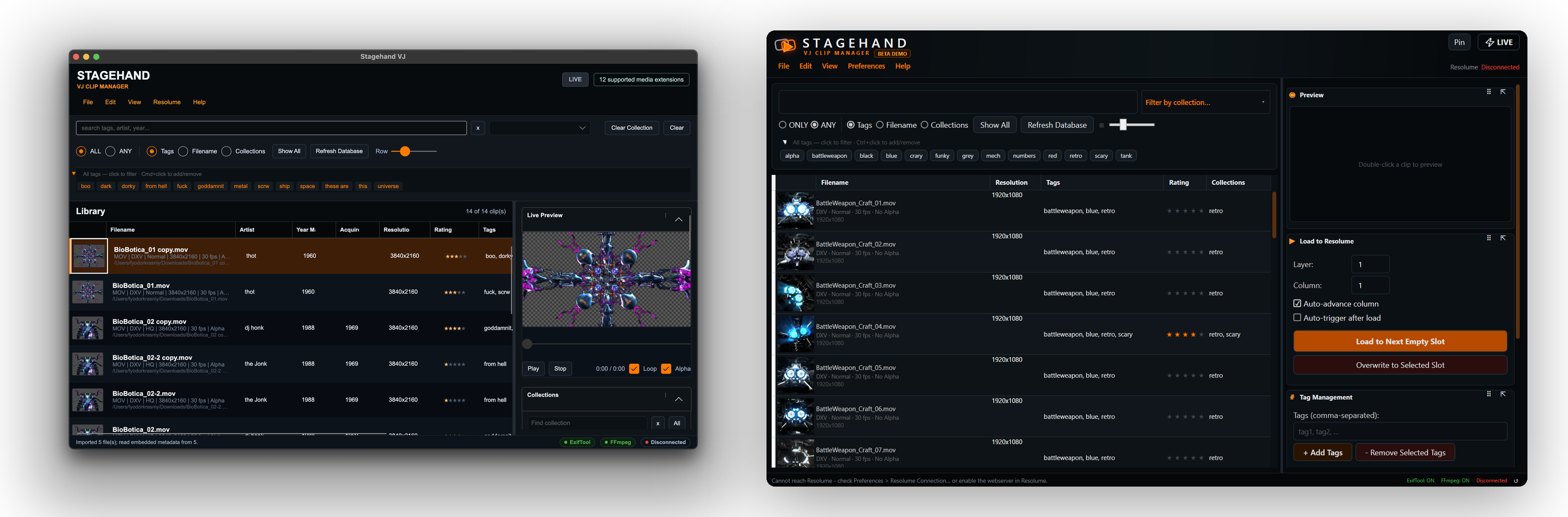
Stagehand VJ running on macOS and Windows — clip library, tagging, live preview, and Resolume load panel
Win + Mac
Signed & notarized
DXV
Resolume-native codec
REST
Resolume API
Local
No cloud, no account
Why it exists

Resolume is a performance tool. It isn't a library manager.

Tag, rating, and collection metadata typically end up encoded in folder names and filenames — workable until a library grows past a few hundred clips. Stagehand provides a dedicated local index, a metadata layer that writes back into the files themselves, and a clean handoff into Resolume via drag-and-drop or REST.

Workflow

Scan, tag, search, preview, load

The five stages of working in Stagehand, from import through Resolume handoff.

01

Scan

Point Stagehand at your clip drive. Thumbnails, codec, FPS, alpha, and existing metadata import in one pass.

02

Tag

Multi-tag across batches. Star-rate clips. Auto-tag from existing folder names if your library is already structured.

03

Search

Filter by tag, rating, collection, codec. ALL or ANY matching across filename, tags, collections, and metadata.

04

Preview

Inline video playback. Loop, scrub, and toggle alpha checkerboard to confirm transparency before commit.

05

Load

Push the selected clip into a Resolume layer + column. Optional auto-advance and auto-trigger after load.

Walkthrough

Six capabilities, in the actual UI

Each section is a cropped view of the app showing one part of the workflow.

01 · Import

Import a folder,
build a searchable index.


Drop a folder onto Stagehand and it reads codec, FPS, alpha, resolution, thumbnails, and any tags already present in file metadata. Existing folder structure becomes a searchable index without renaming a single file.

  • Auto-tag from existing folder names
  • Imports XMP, IPTC, Windows Tags, and QuickTime keywords
  • Handles .mov .mp4 .avi .webm .mkv .gif .dxv .hap and stills
Picking a library folder — Stagehand scans and populates the grid with thumbnails and metadata

Tagging and editing clip metadata inline in the grid
02 · Tag & rate

Tag, rate, and edit
metadata inline.

Tag in batches, apply star ratings, edit Artist/Year/Comments directly in the grid. Multi-clip edits use a "tick what to apply" panel so a Rating change can't silently overwrite Artist on the selection.

  • Comma-separated input adds multiple tags at once
  • Click-to-star ratings, sortable column
  • A–Z tag browser, drag-onto-tag assignment
03 · Preview

Inline video playback,
with alpha and loop.


Double-click any clip to preview in the right panel. Loop, scrub, and toggle an alpha checkerboard to verify transparency before committing the clip to a collection or Resolume slot.

  • Loop toggle and buffering indicator for 4K clips
  • Alpha checkerboard mode
  • Hash-keyed thumbnail cache — instant on reopen
Switching between clip previews inline — loop, alpha, scrub

Building a collection for tonight's set — drag clips into a named collection
04 · Collections

Collections without
duplicating files.

Group clips into named collections — by show, residency, mood, or year. A clip can belong to any number of collections. Filter the grid to one collection in a single click. No duplication on disk, no copy-pasting into "show folders."

  • Drag clips onto a collection row to add
  • Ctrl-click for multi-collection assignment
  • Rename, reassign, or delete — source files untouched
05 · Handoff

Hand off clips to Resolume
by layer and column.


Send the selected clip into Resolume at a chosen layer + column, with optional auto-advance and auto-trigger. Ctrl+Enter loads. Ctrl+Shift+V pulls clips from Resolume back into Stagehand for editing or re-tagging. Pin-on-top + live mode keep the app accessible alongside Resolume.

  • Load to layer + column, or next empty slot
  • Auto-advance + auto-trigger after load
  • Open clips in Resolume Alley from the context menu
Loading a selected clip from Stagehand directly into a Resolume layer and column
Local DB
tags, ratings,
collections,
artist, year
Sync
File Metadata
XMP · IPTC
Windows Tags
QuickTime keys
Your tagging work lives in the files. Copy a clip elsewhere, and the tags come with it.
06 · Portable metadata

Metadata that travels
with the files.

Stagehand writes tags, ratings, artist, year, and collections back into the files themselves — into the standard metadata fields that Windows Explorer, Finder, and other media tools already read. Move a clip to another machine and the metadata travels with it. Switch tools later and the work isn't trapped in a proprietary database.

  • XMP, IPTC, Windows Tags, QuickTime keywords
  • Background write queue — UI doesn't stall on big batches
  • Re-import from files to recover tags after a DB swap
Distribution

Cross-platform, signed, self-contained.

Native binaries on Windows and macOS, all dependencies bundled. No runtime installs, no admin rights, no package managers.

Windows + Mac, native

Windows 10/11 x64 plus native macOS — Apple Silicon arm64 and Intel x64. Mac builds are Developer ID signed, notarized, and stapled. Gatekeeper accepts on first launch — no right-click-Open dance.

Nothing to install separately

Video processing, codec analysis, and metadata writing tools all ship inside the installer/.app. No Homebrew, no Chocolatey, no .NET runtime, no Python. Drag and run. Per-arch native binaries on Mac.

Local-first, no account

Fast SQLite index on your machine. No cloud sync, no sign-up, no telemetry by default. One-time licence activation — after that, Stagehand runs entirely offline.

Reference

More of what's in the box

Additional capabilities outside the headline workflow.

Relink missing files

Moved a drive or renamed a folder? Stagehand detects missing files and lets you relink one — then smart-relinks the rest in the same folder automatically. Tags stay intact.

DXV-aware codec detection

Detects codec, FPS, alpha, quality, and resolution automatically — with specialised support for DXV, the Resolume-native codec.

Sortable, editable grid

Finder/Explorer-style columns you can reorder and resize. Inline-edit Tags, Collections, Artist, Year, Rating, and Comments without opening a popup.

Idle background refresh

After an import or edit, new clips appear in the grid automatically when the user isn't actively typing or selecting.

LIVE mode + pin-on-top

A single button switches to a minimal performance layout. Pin above Resolume on a second monitor or tablet without consuming screen real estate.

Two activations per licence

Each licence covers two machines — typically a primary and backup rig. Deactivate from inside the app to free a slot when a machine is retired.

Database provenance

Each Stagehand database carries its own creator, comment, and timestamps, displayed at the top of the Database panel. Useful when swapping DBs between rigs.

Keyboard shortcuts

Ctrl+Enter loads to Resolume, Ctrl+Shift+V pastes clips from Resolume, F5 reconnects to the Resolume API.

Per-user install

Windows installs to %LOCALAPPDATA% with no admin rights. Mac is a signed .app drag-install. Settings and database survive reinstalls.

Pricing

Try free, pay once

Same binary in both tiers. The licence simply removes the demo's export cap. No subscription, no account, and every update through 1.0 is included.

Demo
Free

Test the workflow on your real files.

  • Full tagging, rating, search, collections
  • Loop preview, alpha, codec detection
  • Resolume drag-and-drop + REST API
  • Local DB, relink-missing, idle refresh
  • ·Metadata export capped at 10 distinct files per session
  • ·One-file-at-a-time export (no batch)

Signed & notarized · clips not included

Recommended
Beta Licence
$25 AUD · one-time

The full app, unlocked. One-time payment, includes every update through 1.0.

  • Everything in the demo
  • Unlimited batch metadata export
  • No per-session file limits
  • Windows + Mac installers (signed & notarized)
  • Two activations per licence — primary + backup
  • One-time activation — fully offline thereafter
  • Free upgrade to 1.0 + all beta updates
  • Priority support via GitHub Issues
Get Beta Licence · $25 AUD

Secure checkout by Lemon Squeezy · Win + Mac bundled

Latest release · Unstable r39 · Windows only

Experimental build

An early build with the newest features, ahead of the stable channel. Possibly unstable — for testing. For day-to-day use, grab the stable demo or licence above (r35).

  • Format / codec sorting — new Format column to sort and group clips by codec
  • Show unrendered clips — toggle via View → Show Unrendered to surface clips that aren't rendered yet
Windows .exe · ~200 MB

Pre-release · no Mac build · expect rough edges

Tutorial

Walkthrough video coming soon

A full setup-to-handoff walkthrough is in production. In the meantime, the demo ships with sensible defaults — point it at a folder and search across all imported metadata immediately.

FAQ

Questions

What's the difference between the demo and the licence? +

It's the same binary. The demo gives you the full app — tagging, search, collections, preview, Resolume drag-and-drop — but caps metadata export at 10 distinct files per app session, one file at a time. Pasting in a licence key removes those caps. You can fully test the workflow before paying.

Is there a Mac version? +

Yes — native macOS builds for Apple Silicon (arm64) and Intel (x64), Developer ID signed, notarized, and stapled. Gatekeeper accepts the app on first launch, no right-click-Open required. Both Mac builds are available as free demos and licence-unlocked from the Download section.

How many machines can I activate? +

Two per licence — usually a main laptop and a backup rig. You can deactivate from inside the app at any time to free a slot when retiring a machine. The buyer portal also lets you manage activations and recover your key.

Does Stagehand work offline? +

Yes. Stagehand activates once over the internet at the moment you paste in a licence key, and after that it runs entirely offline — no periodic licence checks, no calls home. The library, search, preview, and Resolume integration are 100% local.

Does Stagehand work without Resolume? +

Yes — Stagehand is a standalone clip manager. It just happens to integrate especially well with Resolume via drag-and-drop and the Resolume REST API. If you VJ in another tool, the tagging, search, preview, and metadata export still work perfectly.

What file formats are supported? +

Most common video and image formats — .mov .mp4 .avi .webm .mkv .gif .dxv .hap .png .jpg .tiff — with specialised handling for DXV-encoded MOV files (the Resolume-native codec). Stagehand detects codec, FPS, alpha, quality, and resolution automatically.

Where is my data stored? +

Entirely on your machine. Stagehand uses a local database for fast search and writes metadata back into your files using standard metadata fields. No cloud, no account, no telemetry by default.

What happens if I move my clips to a new drive? +

Stagehand detects missing files on startup or when you hit Refresh Database, then lets you relink the missing folder in one step — your tags, ratings, and collections stay intact. Smart cross-relink finds other moved files in the same new folder automatically.

Will beta buyers get the final release? +

Yes. Pay once during beta and you get every update through 1.0 and beyond.

How do I report a bug or request a feature? +

Bug reports and feature requests live on GitHub Issues — see the Support section below. You don't need to be a developer; just describe what happened or what you want.

Updates

Build notifications

Receive a short notification when new beta builds are published or the 1.0 release ships. Email is used only for these notifications.

Powered by Formspree. Your email is only used to contact you about Stagehand.

Support

Bug reports and feature requests

Issues are tracked publicly on GitHub. Tickets receive a response from the developer.